















Logs every trade. Shows you the step to fix.
Closed trades on your connected MT5 account are logged for you. Add your Playbook answers, a note and screenshots, and Analytics ranks what to fix by how much it cost you.
Free plan · No card neededQuestions you might be asking yourself
- I can't tell which step is losing me money.Learn lists your costliest mistakes: trades you took when the playbook's answer said no trade, by playbook and step, with the number of trades and what they cost. Compare with example puts your screenshot next to a valid one.
- One loss and I want to win it back right away.Analytics shows how your next trades went after a losing streak. The Stop-rule simulator replays your closed trades with a rule such as stop after 2 losses in a day. Nothing is traded: it's a what-if, not a forecast.
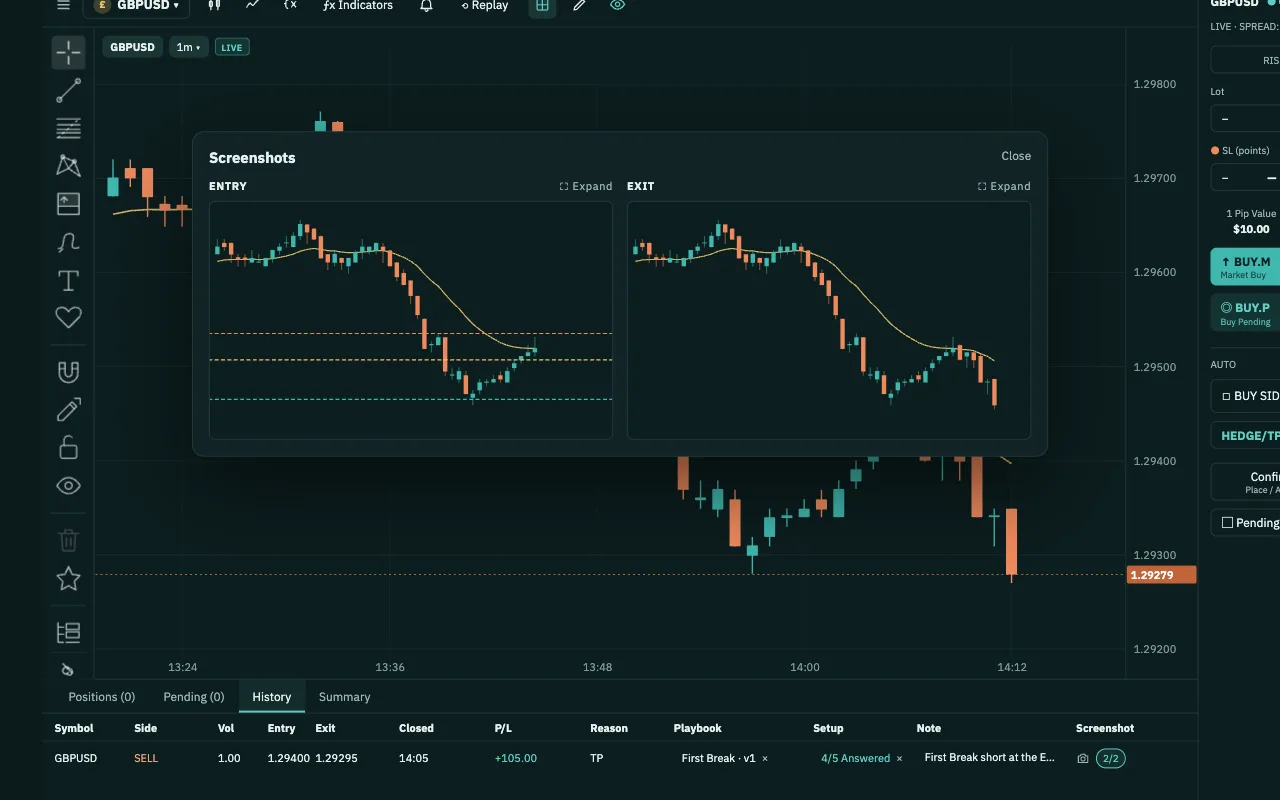
- Keeping a journal takes too long.Closed trades on your connected account show up by themselves, with open time, hold time, result, exit reason and P&L. You add only what your broker can't know: your Playbook answers, a note, and screenshots of the entry and exit.
How Journal & Analytics works
- 1Trade as usualClosed trades on your connected MT5 account appear in Journal Entries on their own. Practice trades in Backtest and Chart Workspace replay are saved too.
- 2Add what only you knowOn the order, or later in History, pick the Playbook, answer each step, add a note, and capture the entry and exit screenshots.
- 3Line up your lossesSwitch to Gallery, filter to Loss and flip through each trade's entry and exit side by side, with its note and answers.
- 4Read AnalyticsChoose Live or practice trades and a period. Summary ranks what to act on by money; Learn and Refine name the step and the answer.
- 5Fix the step, verify againTry a stop rule on your past trades, fix the step in your Playbook, then practise the new version in Backtest.
What you get in Journal & Analytics
- Costliest mistakes by stepTrades you took when the answer said no trade, by playbook and step, with the count, the cost and your screenshot next to a valid example.
- Green and red stepsThe Playbook scorecard colours each answer by its average result per trade, and the same colours show on the playbook itself.
- Stop-rule simulatorReplays your closed trades in order under one rule and compares trade count, net result and max drawdown with and without it. Nothing is traded.
- Practice next to livePut a playbook's practice trades next to its real trades on your MT5 account and see whether it holds up the way it did in practice.
- Honest about small samplesNumbers stay hidden until there are enough trades, and every card shows how many trades it's based on. A handful of trades is an early sign, not a conclusion.
- Gallery, filters and CSVSee every trade as a picture, filter by period, symbol, Playbook, result and completion, and export the real trades from your MT5 account as a CSV file.
You keep your money, your password and the off switch.
- We never touch your moneyDeposits and withdrawals happen at the broker you chose. PipLoop doesn't receive, hold or move your money.
- No broker passwordYou connect with an EA key pasted into your MT5. PipLoop never asks for your broker account password.
- The off switch is yoursTurn AutoDrive off or stop a Flow at any time, from your phone too, and choose to keep or close all positions. To cut the link completely, revoke the key in Settings or remove the EA from MT5.
- Practise on a DEMO accountWe recommend practising on a DEMO account: real market prices, no real money.
Where Journal & Analytics fits in the loop
- STEP 1 · PLANPlaybook
- STEP 2 · VERIFYBacktestFlow Builder
- STEP 3 · APPLYChart WorkspaceAutoDrive
- STEP 4 · IMPROVEJournal & AnalyticsCopilot AI
Questions about Journal & Analytics
No. Closed trades on your connected MT5 account appear by themselves, including trades you place in MT5 directly. Practice trades in Backtest and Chart Workspace replay are saved too. You only add the Playbook answers, a note and screenshots.
The trades you place yourself. Trades run by Flow Builder are left out, and the Summary says how many there are; a Flow's results are in Flow Builder. Choose Live for your MT5 account, or a practice source for your practice sessions.
No. It replays your own closed trades in order under one rule and shows what would have changed. Nothing is traded, and past trades do not predict future results.
If you answer the Playbook on a pending order, the trade counts as planned before entry. A market order that fills at once usually counts as answered after entry. Analytics compares the two, so you can see what planning ahead is worth to you.
Yes, in Chart Workspace. Ask Copilot AI about your journal: it reads the Journal summary and recent trades, using the API key you added from your AI provider. The step-by-step breakdown is on the Analytics page.
Yes. Export downloads a CSV of the trades in the current period and filters. It covers the real trades on your MT5 account.