















Practise your setup one candle at a time
Pick a day from the past, or let PipLoop pick one at random. Replay it bar by bar on up to three timeframes and trade it with practice orders that never reach your MT5.
Free plan · No card neededQuestions you might be asking yourself
- I already know how the chart ends. How do I practise like it's live?Click Random date range and PipLoop moves your start to a random day that has data. No chart shows a candle past the replay time, so you read each one as it prints, just as you would in a live session.
- I analyze on H1 but enter on M1. Can I practise both at once?The default layout puts a 1m entry chart next to 1h and 4h charts of the same symbol, all on one replay clock. Turn on drawing sync and a zone you draw on 1h also shows on 1m.
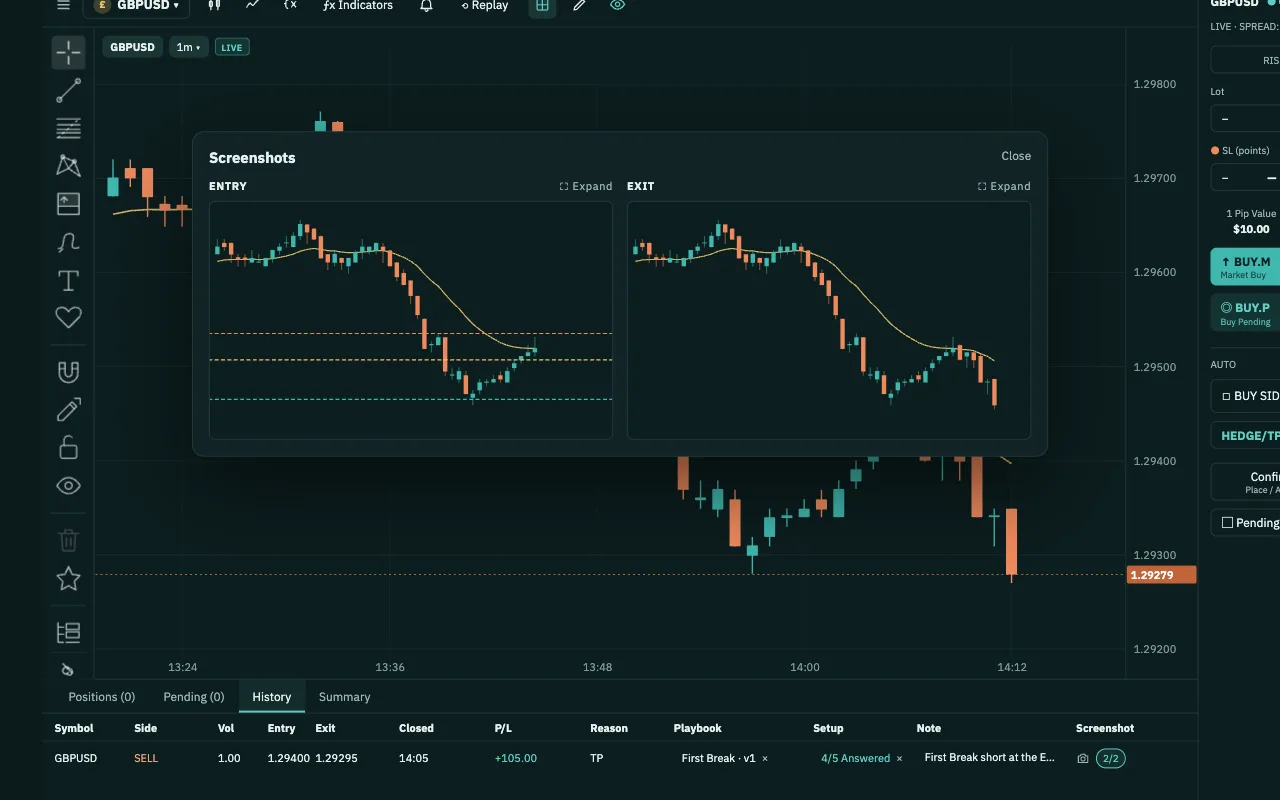
- Do I really follow my rules, or do I just think I do?Every practice trade has Playbook, Setup, Note and Screenshot columns. Journal & Analytics then lets you review your practice trades, playbook by playbook.
How Backtest works
- 1Pick a symbol and a layoutOpen Backtest and pick the symbol on the entry chart; the other charts switch to match. Multitimeframe layout gives you 1, 2 or 3 charts, each on its own timeframe.
- 2Pick a day, or a random oneSet From and To in the date range box, or click Random date range. You can only pick days that have data.
- 3Replay bar by barClick ▶ Start. Play, pause, or step one bar forward or back, at 0.5x to 32x. The higher-timeframe charts follow the same replay clock.
- 4Place practice ordersSize by RISK or LOT and enter SL and TP in points. Click BUY.M or SELL.M, or place a pending order on the chart with BUY.P or SELL.P, then Confirm.
- 5Review it in your JournalFill in Playbook, Setup, Note and Screenshot on each trade, then review your practice results in Journal & Analytics.
What you get in Backtest
- Random date rangeOne click moves your start to a random trading day with data, so you practise on a day you don't remember.
- Up to three timeframes1, 2 or 3 charts of the same symbol. By default a 1m entry chart sits beside 1h and 4h, and the current higher-timeframe candle builds minute by minute.
- Drawing syncTurn it on and charts of the same symbol share drawings: a zone or trend line drawn once shows on every timeframe.
- The chart tools you knowIndicators, chart types and drawing tools sit on the same toolbar and drawing rail as in Chart Workspace.
- Practice trade panelSizing by RISK or LOT, SL and TP in points, 1 Pip Value, Risk / Reward and Est. Margin. Balance, Equity and Floating P/L sit in the dock.
- Journal columns on every tradePlaybook, Setup, Note and Screenshot on positions, pending orders and history: the same columns you use in Chart Workspace.
You keep your money, your password and the off switch.
- We never touch your moneyDeposits and withdrawals happen at the broker you chose. PipLoop doesn't receive, hold or move your money.
- No broker passwordYou connect with an EA key pasted into your MT5. PipLoop never asks for your broker account password.
- The off switch is yoursTurn AutoDrive off or stop a Flow at any time, from your phone too, and choose to keep or close all positions. To cut the link completely, revoke the key in Settings or remove the EA from MT5.
- Practise on a DEMO accountWe recommend practising on a DEMO account: real market prices, no real money.
Where Backtest fits in the loop
- STEP 1 · PLANPlaybook
- STEP 2 · VERIFYBacktestFlow Builder
- STEP 3 · APPLYChart WorkspaceAutoDrive
- STEP 4 · IMPROVEJournal & AnalyticsCopilot AI
Questions about Backtest
From historical 1-minute price bars for the symbol you pick. Backtest replays those bars and builds the 1h and 4h charts from them; it doesn't replay single ticks. To replay your own broker's prices, use Replay in Chart Workspace, which reads price history from your MT5.
Not yet. A market order fills at the close of the latest 1-minute bar, and pending orders, SL and TP fill at their exact price. No spread, commission or slippage is added, so allow for them when you read your results.
The SL counts. When one 1-minute bar touches both levels, Backtest closes the trade at the stop: the worse case, not the better one.
No. Backtest runs in your browser. Its orders, fills and balance are all simulated and never reach MT5 or your broker account. Results are simulated practice on past data and do not guarantee future results.
Not to practise. To save the Journal columns on your practice trades, yes: the practice Journal is saved with your signed-in PipLoop account and its connected MT5 account.
Step back 1 bar rewinds the session, and any open positions and pending orders end at that point. Use it to study a bar again, not to undo a trade.
Pick a day you don't remember and trade it one candle at a time.
Free plan · No card needed
Start free