















FX Replay alternative: practise, then apply on your own MT5
FX Replay is a dedicated replay and backtesting tool with a wide market list. PipLoop is built around MT5: practise bar by bar, replay your own broker's prices, then trade from the same chart and checklist.
Pick FX Replay if you mainly backtest by hand and want many markets, long history, seconds timeframes, cost settings in every session or a prop-firm simulator. Pick PipLoop if you trade on MT5 and want practice, your Playbook, your orders and your Journal in one loop on your own account.
Where FX Replay is strong
- A wide market list: forex, indices, metals, energy, bonds, stocks, crypto, futures and agricultural markets, many with years of history.
- Replay from 1-minute to monthly charts, and seconds timeframes on its Pro plan for supported assets.
- Spread and commission settings in each practice session, so manual backtests can include costs.
- A prop-firm challenge simulator with rule tracking, plus an RR simulator and order-flow tools.
- Backtest analytics and journals, including a live trading journal that syncs trades from MetaTrader and other trading apps.
Where PipLoop differs
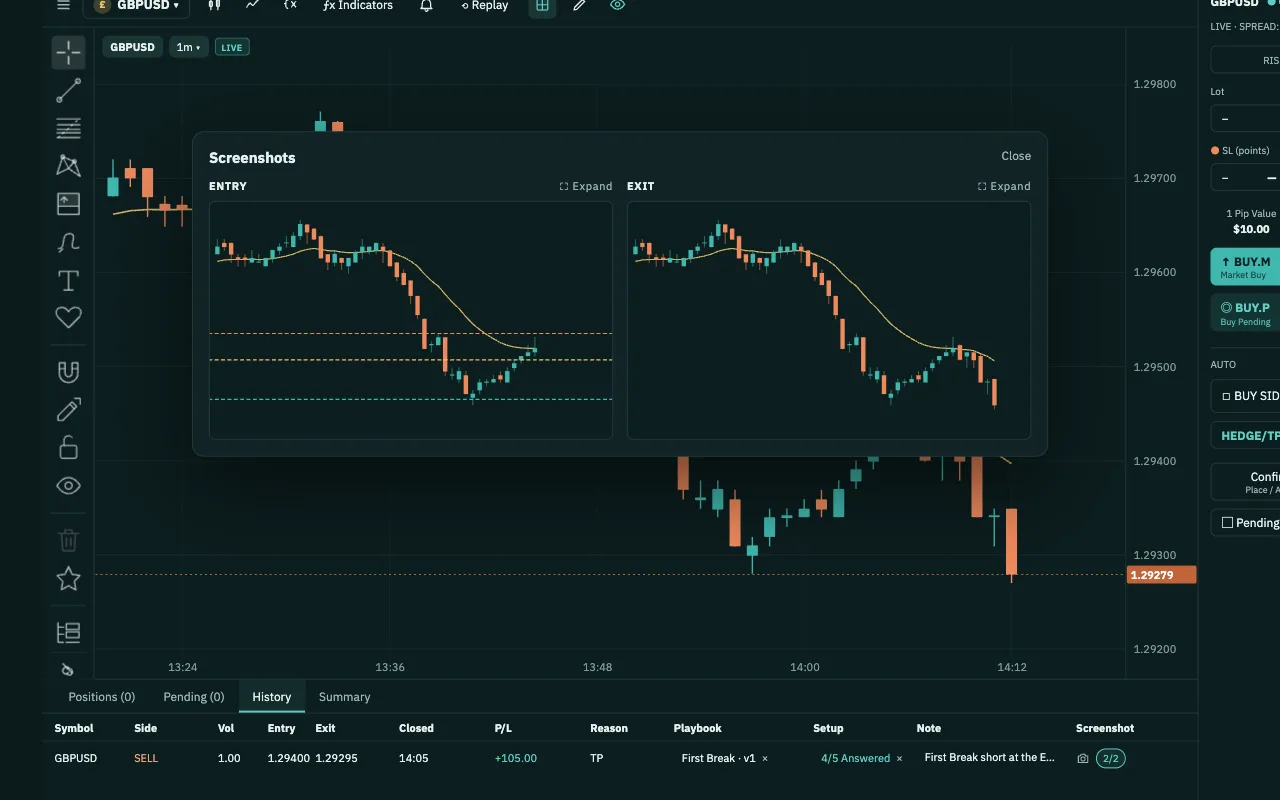
- Replay your own broker's pricesReplay in Chart Workspace reads 1-minute history from your own MT5, so you practise on your broker's candles. Replay orders are paper trades and never reach your account.
- Practise where you tradeThe charts, drawing tools and trade panel you practise with are the ones you place orders from, through the PipLoop EA on your MT5 at the broker you choose.
- A checklist on every tradeAttach your Playbook to a practice or live order and answer each step. Journal & Analytics then lists your costliest mistakes by step, with the money they cost.
- Verify before you automateFlow Builder backtests drag-and-drop rules on M1 bars built from real tick data, with the costs you set, then runs the same Flow on your MT5.
Side by side
| FX Replay | PipLoop | |
|---|---|---|
| Markets and history | Many asset classes, years of history | Fewer symbols in Backtest today |
| Bar-by-bar replay | Yes | Yes: Backtest and Chart Workspace Replay |
| Smallest timeframe | Seconds (Pro plan, some assets) | 1 minute |
| Spread and commission in manual practice | Yes, set per session | Not yet |
| Replay on your own broker's prices | Partly: data from listed brokers | Yes: Replay reads your MT5 history |
| Checklist on each trade | Yes: checklists on journal entries | Yes: Playbook steps on each order |
| Prop-firm challenge simulator | Yes | No |
| Orders on your own MT5 account | No: practice; real trades sync to its journal | Yes, through the PipLoop EA (DEMO accounts today) |
| Analytics | Win rate, profit factor, calendar, CSV | Costliest mistakes by step, stop-rule simulator, CSV |
Questions about switching
Two places. Backtest replays historical 1-minute bars for the symbols PipLoop has loaded. Replay in Chart Workspace reads 1-minute history from your own MT5, so you practise on your broker's candles. Neither replays single ticks, and neither adds spread or commission yet, so allow for costs when you read your results.
In Backtest, the symbols PipLoop has history for: a shorter list than FX Replay's today. In Chart Workspace Replay, the symbols your MT5 broker offers, on the chart types and intervals Replay supports. Flow Builder backtests only symbols with PipLoop tick data.
Not to practise in Backtest. To save the Journal columns of practice trades, to use Chart Workspace and its Replay, and to run a Flow or AutoDrive, yes: an MT5 account with the PipLoop EA running. DEMO works the same way. PipLoop does not support MT4 yet.
Yes, that is the loop. The chart, Playbook and trade panel you practise with in Chart Workspace Replay are the ones you place orders from on the MT5 account you connect. We recommend a DEMO account first. Practice results are simulated and do not predict future results.
Yes. Nothing stops you practising in FX Replay and doing the MT5 side in PipLoop: your Playbook, Chart Workspace, Journal & Analytics and Flow Builder.
From FX Replay's public pages, checked on October 30, 2026:
- FX Replay Help Center: What assets are available for backtesting? (last modified 2026-10-28)
- FX Replay Help Center: Explore multiple assets with FX Replay (2026-10-08)
- FX Replay Help Center: Understanding spreads and commissions (2026-06-26)
- FX Replay Help Center: Prop Firm Simulator (2026-06-26)
- FX Replay Help Center: Getting started
- FX Replay Help Center: Introduction to forex backtesting
- FX Replay product update: The best free live trading journal is here (2026-06-04)
- FX Replay: Trading journal
FX Replay is a trademark of its owner. PipLoop is not affiliated with or endorsed by them.